LIQUIDWAVE for Mac · Features
Now Playing, hung from your Mac's notch.
Updated 15 September 2026
The notch on a MacBook is a camera housing with a strip of menu bar on either side. LIQUIDWAVE hangs a small Now Playing island from it, in the spirit of the iPhone's Dynamic Island: the song playing in Spotify, Apple Music or your browser, with its cover and controls, a click away. It comes with LIQUIDWAVE for Mac, it is on from the first launch, and it works in the free download.
What it shows
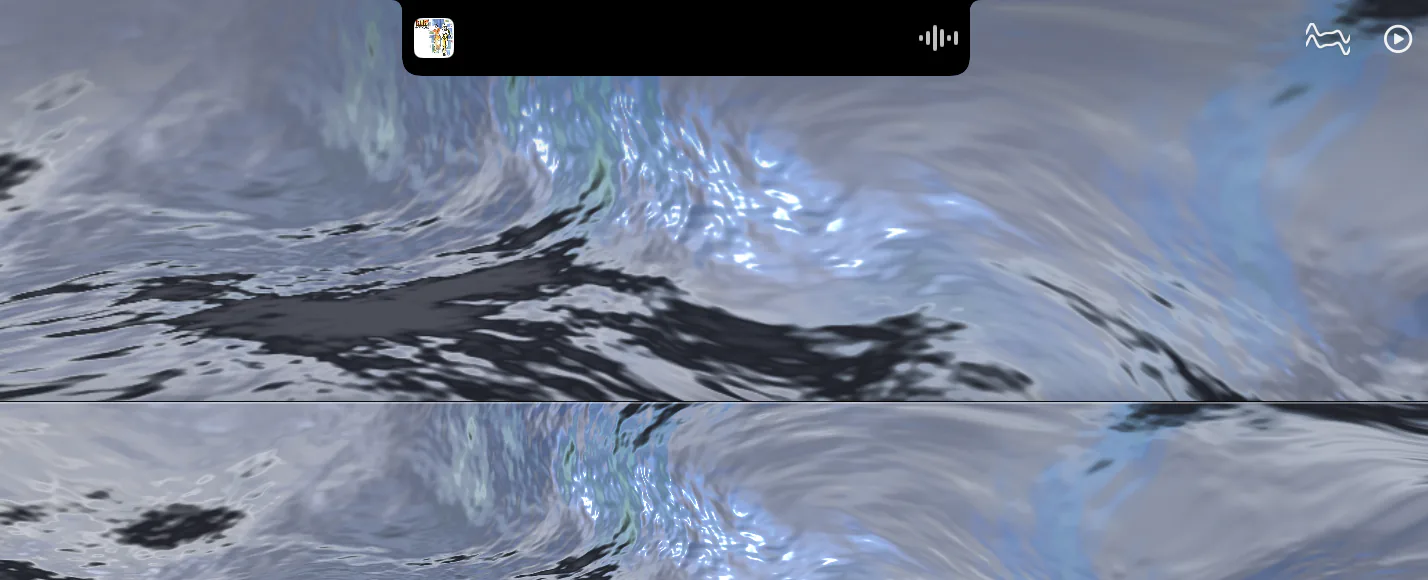
Closed, the island flanks the notch rather than covering it. The cover of the current track sits to the left of the cutout and a live level meter to the right, both on black, so the three read as one slightly wider notch and the menu bar gives up as little room as possible. Nothing is drawn inside the cutout itself, because there are no pixels there.
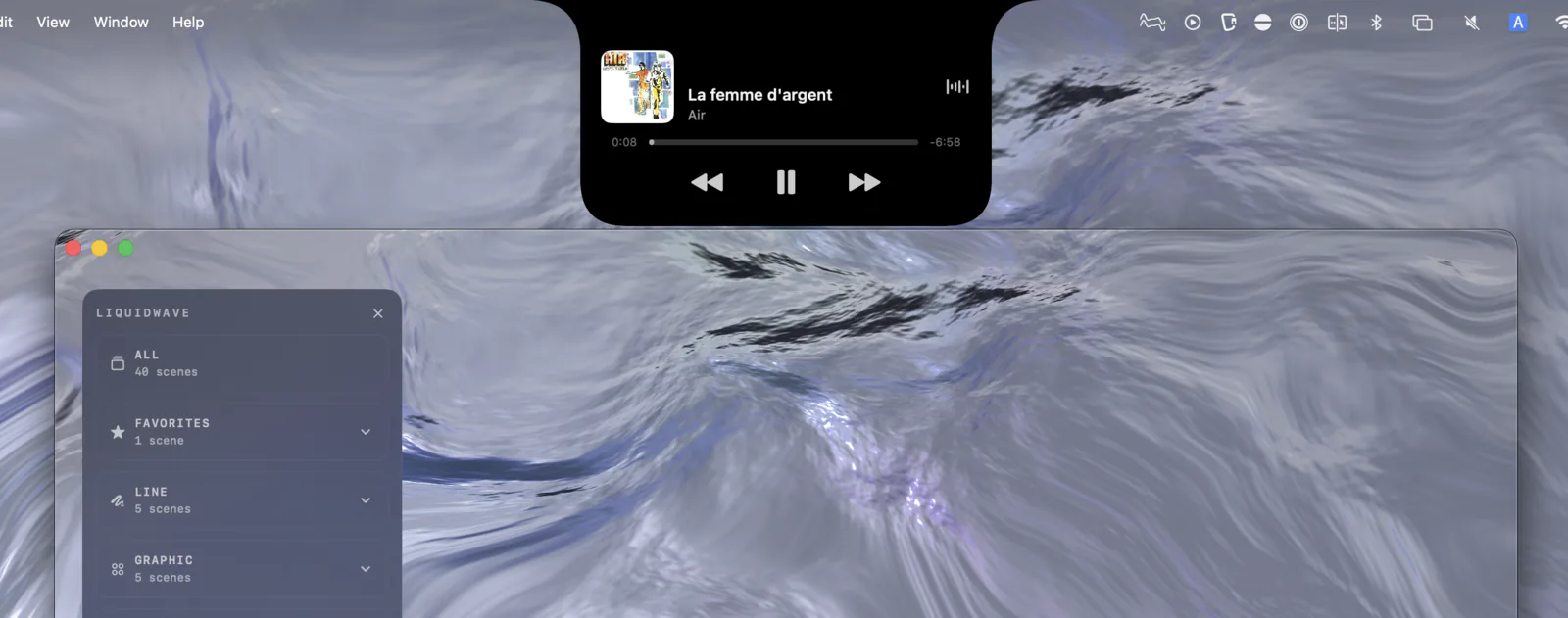
Open, a card comes down below the notch: the artwork, the title and artist, the elapsed time, a progress bar and the time remaining, and previous, play/pause and next. The cover, title and artist are one button that brings the player forward. There is no heading and no logo on the card. It says what is playing and lets you act on it.
It works before you allow anything
Spotify and Apple Music announce every track change to the system, and LIQUIDWAVE listens for those announcements. The title, artist and album arrive the moment a song changes, and receiving them needs no permission at all. The cover is found by looking the album up in Apple's music catalog, which needs no permission either. Install the app, press play, and the island already knows the song.
Allow more, get more
The second layer uses Apple Events, the same mechanism AppleScript uses, and macOS asks for it once per app. LIQUIDWAVE never asks on its own. When the island has a player it cannot fully see, it offers a Connect Spotify… card, or Connect Apple Music…, and pressing it raises the system prompt for that one app. If you decline, the island points you to System Settings → Privacy & Security → Automation, where you can change your mind later.
Connecting a player adds the rest:
- The player's own artwork, which is exact, and covers music outside Apple's catalog.
- The play position, so the progress bar is exact, including after a seek.
- Previous, play/pause and next, which act on a player you have connected.
- A player that was already playing when LIQUIDWAVE launched. Without the connection, the island waits for the next track change.
- Your browser. In Safari and in Chromium browsers such as Chrome, Arc, Brave, Edge, Vivaldi and Opera, the island reads the playing tab on the Spotify and Apple Music web players, SoundCloud, Bandcamp, Tidal, Deezer, Amazon Music and a few more. YouTube and YouTube Music are read in the Chromium browsers; in Safari their tabs show only that Safari is playing.
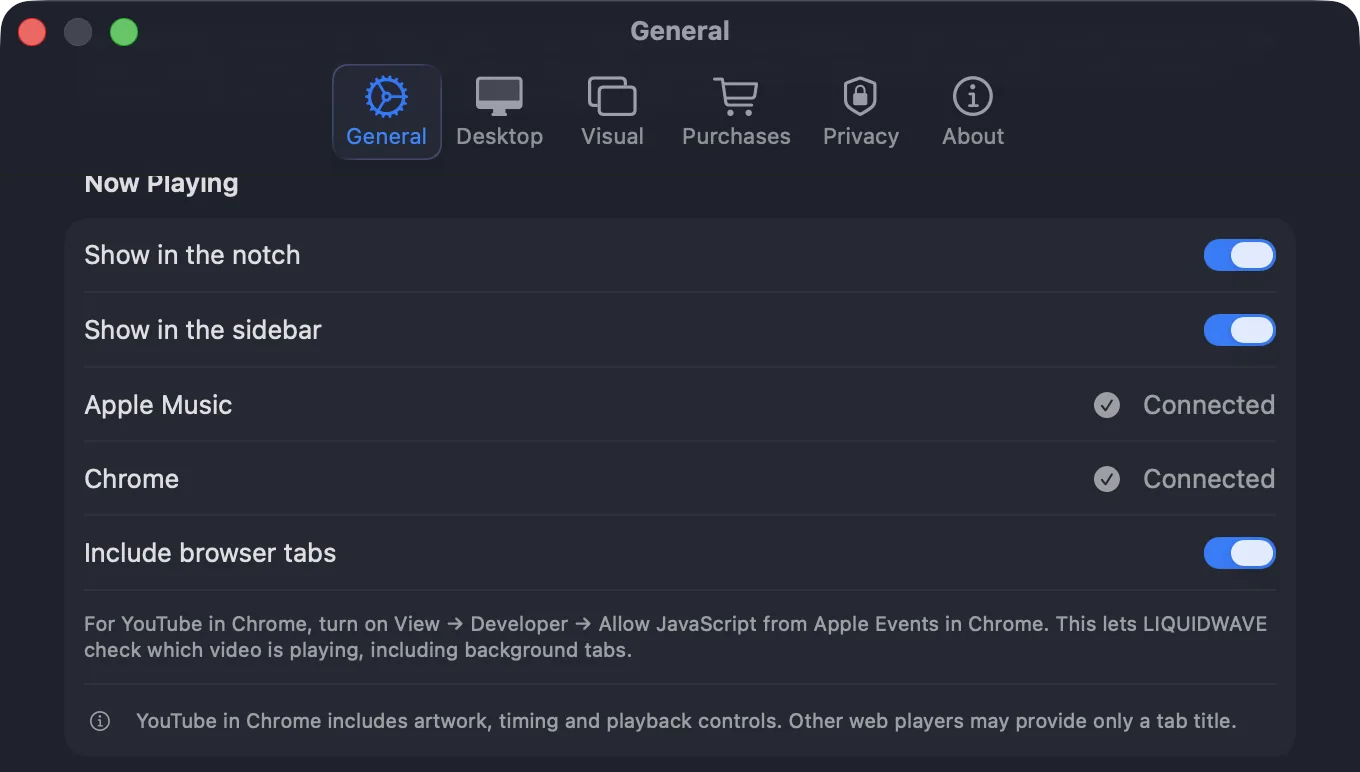
YouTube in a Chromium browser goes furthest. A playing video shows its title, channel, time and thumbnail, with the same three controls. Chrome keeps this off until you turn on View → Developer → Allow JavaScript from Apple Events.
It follows the sound, not the front window
A tab left open in the background shouldn't take the island away from the music you are actually hearing. LIQUIDWAVE already knows which app is producing sound, because that is how it visualizes your Mac's audio, and the island uses the same knowledge. A browser is only consulted when it is the one making the sound. When more than one player could claim the island, the audible one wins, in the order Spotify, Music, browser.
Pausing doesn't blank the card. The track stays for thirty seconds with the time frozen and the cover dimmed, and anything that starts playing replaces it at once.
How it opens and closes
Hover over the closed island and it grows by a couple of points, the way a button acknowledges the pointer. Click it, scroll down on it or drag it down, and the card opens. Scroll up, or move away for two seconds, and it closes. A new track opens nothing: the closed island swaps its cover quietly, and the card only comes down when you ask for it.
The motion is a single spring. One value runs from closed to open, and the width, corners and height are all derived from it, so the shape never disagrees with itself mid-move. The width settles first and the height follows, which reads as a sheet coming down. A trackpad flick hands its speed to the spring, so the card keeps going. With Reduce Motion turned on, the island uses a short transition without the bounce.
The island floats above the menu bar, so a click anywhere on the menu bar puts an open card away, and the menu you clicked opens on that same click.
Where it appears
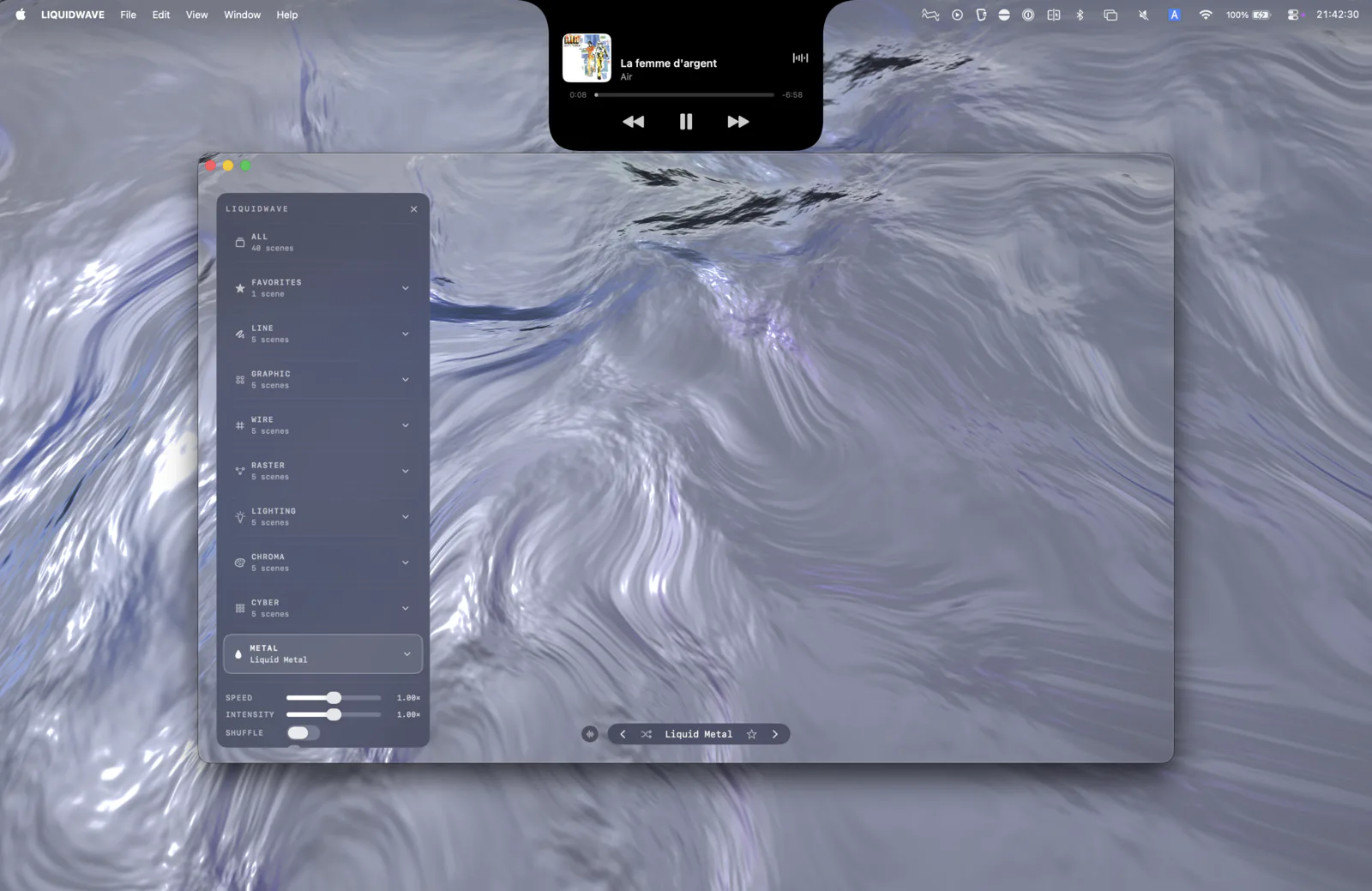
The island lives on the built-in display of a Mac with a notch. On an external monitor, or a Mac without a notch, a pill in the middle of the menu bar would be decoration rather than an island, so the island stays away from those screens. The same track also appears as a row in LIQUIDWAVE's sidebar, on any Mac and wherever the window is. When an app goes full screen the menu bar hides, and the island steps aside with it.
Both are on by default. Settings → General → Now Playing has separate switches for Show in the notch, Show in the sidebar and Include browser tabs.
What it doesn't do
It doesn't use private system APIs. Recent versions of macOS reserve the system's own now-playing service for Apple's apps. LIQUIDWAVE reads players the public way, through system notifications and Apple Events.
A web player is read from its tab title. A tab title is the least reliable thing the island shows, so it only separates the artist from the song where the site's own title makes that clear, and otherwise shows the title whole. With two players playing in different tabs it can't tell which one you mean, and it shows only which browser is playing.
Artwork is fetched. The cover comes from the image address the player supplies or, when needed, from Apple's iTunes Search API, which receives the artist and the album or song title. YouTube thumbnails come from YouTube's image host. Those requests are the only ones the island makes about what you are playing. LIQUIDWAVE has no account and keeps no listening history, and the privacy policy describes the requests in full. Music outside Apple's catalog may have no cover.
A notch app, or a visualizer with an island
Dedicated notch apps turn the cutout into a shelf for calendars, battery levels, files and timers. LIQUIDWAVE's island does one thing, the song that is playing, and it comes with a music visualizer that draws that song across your screen, or behind your desktop icons in Desktop Mode. If you want a shelf, a notch app is the better choice. If you want to see the music, the island is part of that.
macOS 14.2 or later · notarized by Apple · free
Questions
- Does the island need Accessibility or Screen Recording permission?
- No. Track names and covers from Spotify and Apple Music need no permission at all. The play position, the controls, the player's own artwork and browser tabs need Automation access for each app, which macOS asks for when you connect that app from the island.
- Is it in the free version?
- Yes. The island isn't part of the scene catalog, so the free download includes all of it.
- Which Macs show the island?
- Macs with a notch in the built-in display, such as the 14- and 16-inch MacBook Pro from 2021 on and the MacBook Air from 2022 on, running macOS 14.2 or later. On other Macs, the same track appears as a row in LIQUIDWAVE's sidebar.
- Can I turn it off?
- Yes. Settings → General → Now Playing has separate switches for the notch, the sidebar row and browser tabs.